Cheat Manager Menu
An in-game cheat menu that builds itself out of the cheat functions already in your project.
Write a UFUNCTION(Exec), press F1, and it is in the menu with the right input widget on the row. No registration step, no list to keep in sync, no menu code to write.
The store listing is not up yet. Mail JackABrewer@protonmail.com and you will hear the day it goes up, along with what changed between now and then. Replies take a few working days.
At a glance
- Engine
- UE 5.8
- Platform
- Win64
- Modules
- 1 runtime
- Content
- None
Shipping builds
The module is compiled out by the plugin descriptor. No way to leave the menu in a shipped game by accident.
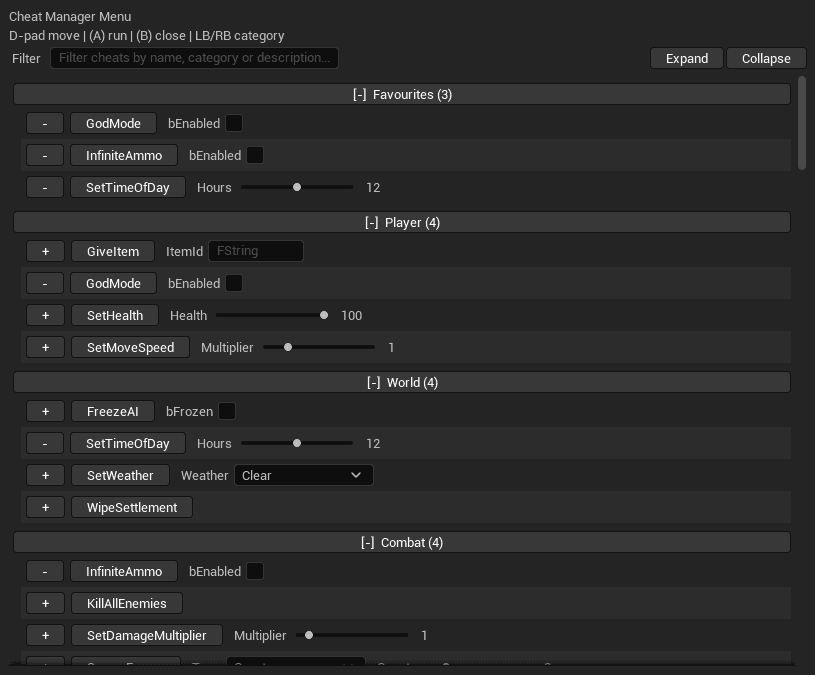
Built for a list that got long
Four categories and fifteen cheats in a real project, six months in. The menu is built for that, not for the demo case.
- Filter box matching on name, category and description, expanding collapsed sections so a match cannot hide
- Favourites, pinned with the + button on a row, persisted to config
- Recently Used, per session, with a configurable length
- Category ordering you can pin in Project Settings
- Panel size and offset configurable, with the height capped against the viewport
How it works
The menu reads the local player’s UCheatManager and every extension registered on it, then draws a row per cheat. Parameters get a widget picked from their type.
- bool
- Checkbox
- Enum
- Dropdown
- int32 / float + range
- Slider
- Everything else
- Text box
/** Sets the time of day, in hours. */
UFUNCTION(Exec, Category = "World")
void SetTimeOfDay(
    UPARAM(meta = (UIMin = "0", UIMax = "24",
        Delta = "0.25", UIDefault = "12"))
    float Hours);

/** Removes every building. Cannot be undone. */
UFUNCTION(Exec, Category = "World",
    meta = (CheatConfirm = "Wipe the settlement?"))
void WipeSettlement();
One slider from 0 to 24 in quarter-hour steps starting at noon. One that asks before it runs.
It still works after you package
Reflection metadata is stripped at cook, so reflection-driven menus usually collapse into a flat alphabetical list of text boxes in a packaged build. This one records what it needs while it draws in the editor and reads it back at runtime.
Usual result, packaged
[-] Uncategorized (4)
      GiveGold        [    ]
      ResetTutorial
      SetTimeOfDay    [    ]
      SetWeather      [    ]
This plugin, packaged
[-] Player (1)
      GiveGold        Amount [    ]
[-] World (2)
      SetTimeOfDay    Hours  ▸───
      SetWeather      Weather [Clear v]
Designers can add cheats too
Derive a Blueprint from Cheat Menu Blueprint Extension, add impure functions to it, then list the class under Blueprint Cheat Extensions in Project Settings. Those functions appear beside the C++ cheats with the same categories, tooltips and parameter widgets. No programmer, no rebuild.
Input it takes, input it leaves alone
F1 opens the menu. No gamepad button is bound out of the box, and that is deliberate: the plugin registers an application-wide Slate input pre-processor and consumes whatever you bind to it, so taking a face button from your game without asking is not a call a plugin should make.
Bind one in Project Settings and the menu drives from a pad, with the D-pad or left stick to move, (A) to run a cheat, and the shoulder buttons to jump between categories. The console command CheatMenu.Toggle opens it on any device with no bind at all, which is the way in on a touch device or a machine with no keyboard attached.
bEnabled is a real off switch. Clearing it stops the subsystem being created, which takes the input pre-processor and the console command with it.
What you get
- One runtime C++ module, CheatManagerMenu, denied for the Shipping configuration
- Five C++ classes: subsystem, settings, Blueprint cheat extension base, metadata store, module
- Blueprint nodes for Toggle Menu, Toggle Menu For User and the menu's open state
- Console command CheatMenu.Toggle, log category LogCheatMenu
- No content assets
Before you install
Requirements, and three things to know
Engine and configurations
Unreal Engine 5.8, Win64, editor and packaged Development or Test builds. The module is excluded from Shipping. Dedicated servers and commandlets have no Slate application, so the menu does not create itself there.
Tick it after installing
A plugin installed to the engine from the launcher is not enabled until you tick it under Edit > Plugins, in the Debug category, then restart. A Blueprint-only project works in the editor with no compiler. Packaging a Development, DebugGame or Test client build does need a C++ toolchain.
Renders with SlateIM
SlateIM is an experimental plugin that ships with Unreal and is enabled automatically as a dependency. Epic offers no API stability guarantee for experimental plugins, so this product is supported per engine version, and each engine release is built and verified before it is listed.